How do I post on Stocktwits?
To share an idea or comment on Stocktwits, use the message area located at the top of your stream or on any ticker page. Before you post: You must verify your e
Articles
- How do I delete a message?
- Understanding Message Volume on Stocktwits
- How do I filter my stream?
- How do I get a verified account?
- How to Change Your Email Address
- Using Sentiment on Stocktwits
- Why can’t I view someone’s profile?
- How do I unblock someone?
- How do I follow someone on Stocktwits?
- What do the bullish and bearish buttons do?
- How do I report a user?
- Why can't I post on Stocktwits?
- How do I reset my password?
- I’m not receiving the password reset email.
- Understanding Watchers on Stocktwits
- How do I delete my account?
- How do I post on Stocktwits?
- How do I sort my watchlist?
- How do I block someone?
- My account was suspended. What should I do?
- How do I stream messages in real-time?
- I’m not receiving push notifications.
- How do I add a chart or image to the Stocktwits stream?
- Where can I see Stocktiwts' Privacy Policy and Terms of Use?
- Why doesn’t Stocktwits support OTC stocks?
On this page
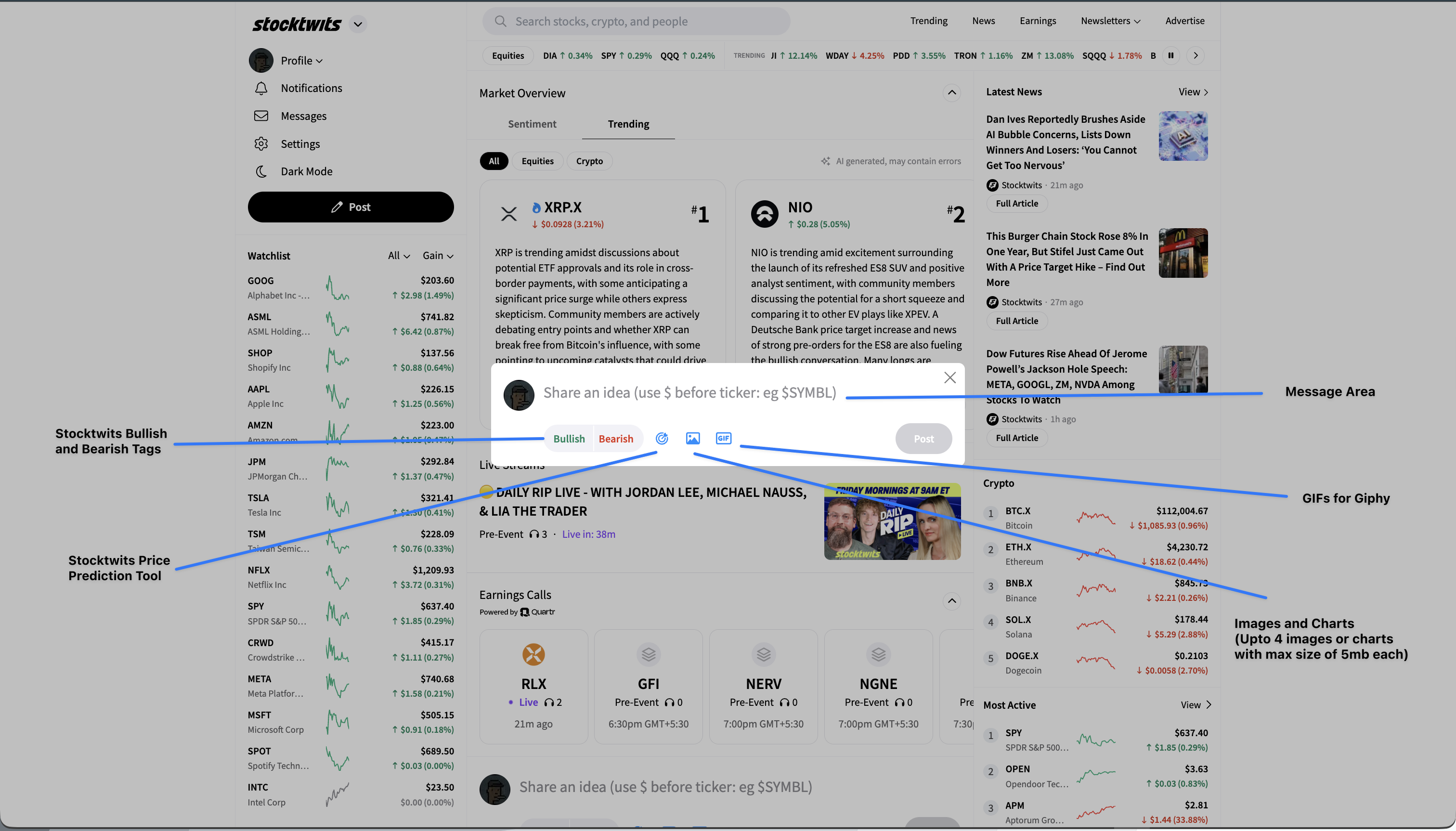
To share an idea or comment on Stocktwits, use the message area located at the top of your stream or on any ticker page.
Before you post:
You must verify your email address. Check your inbox (or spam) for the verification email sent at sign-up.
If your account is suspended or banned, your posts will not appear in the stream.
Steps to post:
1. Enter your message in the box labeled “Share an idea (use $ before ticker: eg $AAPL)”.
Always include a cashtag (a ticker symbol with a $ prefix, e.g. $TSLA) to tag your post to that stock or crypto.
2. Add details to your post (optional):
Bullish/Bearish Tags → Indicate your sentiment.
Price Prediction Tool → Share your forecast (if enabled).
Images/Charts → Upload up to 4 images or charts (max 5MB each).
GIFs → Add a GIF via Giphy.
3. Click “Post” to publish your message.
Your post will then appear in the relevant ticker stream and on your profile (unless your account is restricted).